Find where your software lacks SEO & AEO coverage. Book a Strategy Call


Your CEO drops a ChatGPT screenshot into Slack: “Why does it recommend our competitor and not us?” You run the same prompt and you’re in the list. A teammate runs it ten minutes later and you’re gone again.
That’s the core problem with tracking brand mentions in AI search. The answers change on almost every run, so one check is a coin flip, not a data point.
To track brand mentions in AI search, run a fixed set of 20 to 30 buyer prompts across ChatGPT, Google AI Overviews and AI Mode, Perplexity and Gemini. Repeat each prompt several times. Log whether you’re named, which sources the answer cites, and what traffic follows. Then switch on the free AI reports Google and Bing launched in 2026, and an AI channel in GA4.
This guide covers measuring, not fixing. There’s a short section on what to do with the numbers near the end. We’re a B2B SaaS SEO and AEO agency: we don’t sell a tracking tool, and no vendor paid to be mentioned here. Tool prices come from each vendor’s own page, checked on October 27, 2026.
TL;DR
- One check means nothing. In SparkToro’s 2026 study, ChatGPT and Google’s AI returned the same brand list less than once in 100 runs. Track how often you appear across many runs, not your “position”.
- Track three layers: the answer (are you named, how, and is it right), the sources (which pages the AI cites), and the traffic (what clicks through).
- Write prompts the way buyers ask. Cover category, comparison, alternatives, use-case and brand-fact prompts.
- Size your sample. About 100 answers per platform gives a mention rate within roughly ±10 points. A smaller move is noise.
- Turn on the free data today: Search Console’s Generative AI report (open to all sites since August 31, 2026), Bing’s AI Performance report and a custom AI channel in GA4.
- Paid trackers we checked start at $29 a month. What you’re really buying is sample size: 50 prompts run daily is about 1,500 answers per model per month.
On this page
- What tracking AI brand mentions means
- Why one check tells you nothing
- Step 1: Build a prompt set from real buyer questions
- Step 2: Pick platforms and lock your test conditions
- Step 3: Log every answer in one sheet
- Step 4: Track the sources behind the answers
- Step 5: Measure the traffic, and the part you can’t see
- Check that AI crawlers can reach your site
- Free or paid: pick the setup that fits your stage
- What to do with the numbers each month
- FAQ
What tracking AI brand mentions means
Tracking brand mentions in AI search means measuring, on a schedule, how often AI assistants name your brand when buyers ask about your category. It also covers what they say about you and which sources they cite.
That breaks into three layers. Most guides cover the first two and skip the third.
| Layer | What it tells you | Where the data comes from |
|---|---|---|
| Answers | Are you named? Recommended or just listed? Is the description right? | Your own prompt runs, by hand or with a tracker |
| Sources | Which pages the AI reads and cites when it answers | Cited links in each answer, Bing’s AI Performance report, Search Console’s Generative AI report |
| Traffic | Whether AI answers send visits, signups and demos | GA4, server logs, your demo form |
The answer layer tells you where you stand. Sources tell you what to fix. Traffic tells your CFO whether any of it matters.
Mentions and citations are different signals
A mention is your brand named in the answer text. A citation is a linked source the answer used, which can be your page or someone else’s. You need both columns in your log, because the gap between them points to the fix.
Being read is not the same as being credited. In Ahrefs’ April 2026 study of 1.4 million ChatGPT prompts, ChatGPT cited only about half (49.98%) of the URLs it pulled in while writing answers (Ahrefs).
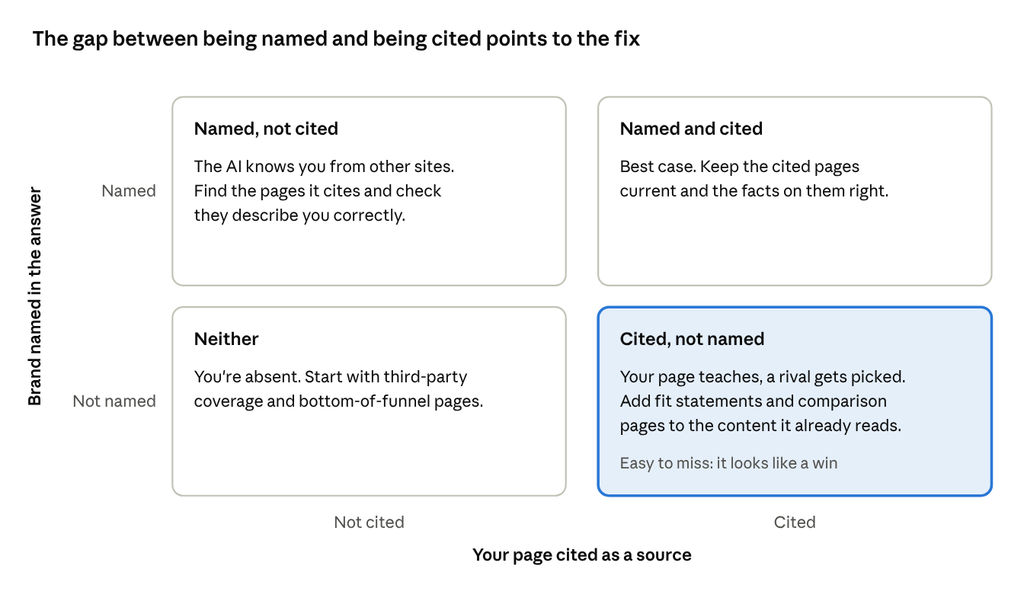
Watch the bottom-right box most closely. It’s easy to miss because it looks like a win in a citation report: your blog post explains the problem, the AI cites it, and then it recommends a competitor. Your content did the teaching. Someone else got the shortlist spot.
Why one check tells you nothing
AI assistants don’t return a fixed answer. Ask the same question twice and you’ll often get a different list of brands, in a different order. So treat AI tracking like a survey: the number that matters is the share of many answers that name you.
A useful public test comes from SparkToro. Rand Fishkin and Patrick O’Donnell of Gumshoe.ai had volunteers run 12 brand-recommendation prompts 60 to 100 times each. They covered ChatGPT, Claude and Google’s AI, nearly 3,000 runs in total (Search Engine Journal’s summary, January 2026; the original study):
- ChatGPT and Google’s AI returned the same brand list less than once in 100 runs.
- The same list in the same order came up less than once in 1,000 runs.
- How often a brand appeared was far steadier. For headphones, Bose, Sony, Sennheiser and Apple each showed up in 55% to 77% of answers.
Two rules follow from this.
Drop “average position” as a headline metric. If the order changes on nearly every run, position 2 versus position 4 tells you very little. Track the mention rate instead: the share of answers that name you.
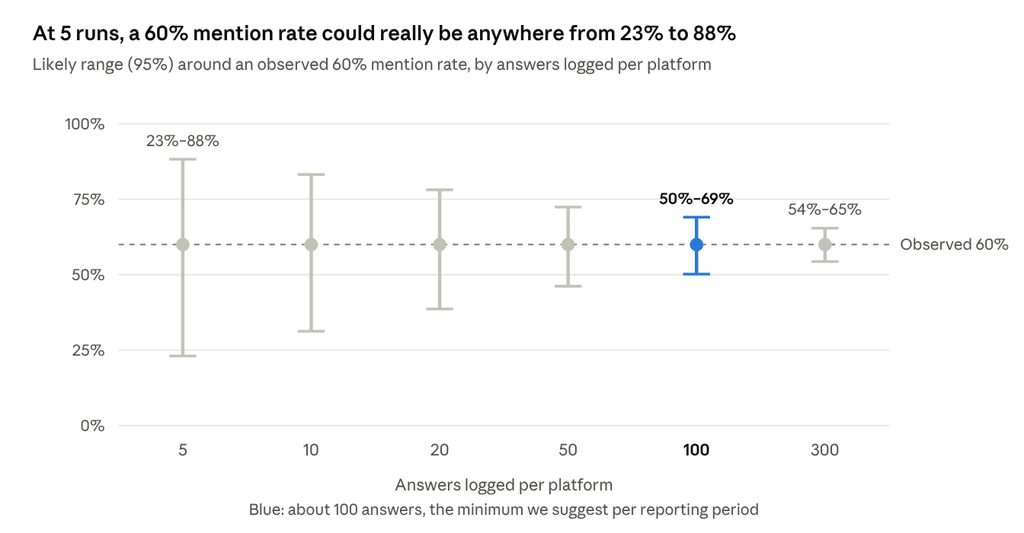
Size your sample before you read a trend. A small sample swings wildly. If you show up in 3 of 5 runs, that’s 60%, but the true rate could be anywhere from 23% to 88%. At 60 of 100 runs, the range tightens to 50% to 69%.
Here’s what that means for a competitor comparison. Say you’re named in 30% of answers and a rival in 40%:
- 100 answers each: the 10-point gap could easily be chance (p ≈ 0.14). Don’t report it as a lead.
- 300 answers each: the same gap is very likely real (p ≈ 0.01).
A practical rule: aim for about 100 answers per platform per reporting period, which puts your mention rate within roughly ±10 points. Treat any month-to-month move smaller than that as noise.
One caveat. These ranges assume every answer is independent. Answers to the same prompt are more alike than answers to different prompts, so your real uncertainty is a little wider. Pool results across prompts (by platform, or by buyer stage) rather than reading single prompts, and treat the ranges above as the best case. A July 2026 preprint on citation rankings across Gemini, ChatGPT search and Perplexity reached a similar conclusion: no single run count works for every platform and topic (arXiv; not peer-reviewed, and the author sells AI visibility software).
Step 1: Build a prompt set from real buyer questions
Start with 20 to 30 prompts that match how your buyers ask AI for help, spread across the stages of a software purchase. This list is the biggest decision in the whole setup, because every number you report later depends on it.
Don’t just paste your keyword list. People type a few words into Google, but they write full sentences with context into ChatGPT. Google’s AI Overviews and AI Mode also use “query fan-out”: they split one question into several related searches before writing the answer (Google). The context a buyer adds changes which searches run, and so which brands come back.
Here’s the difference:
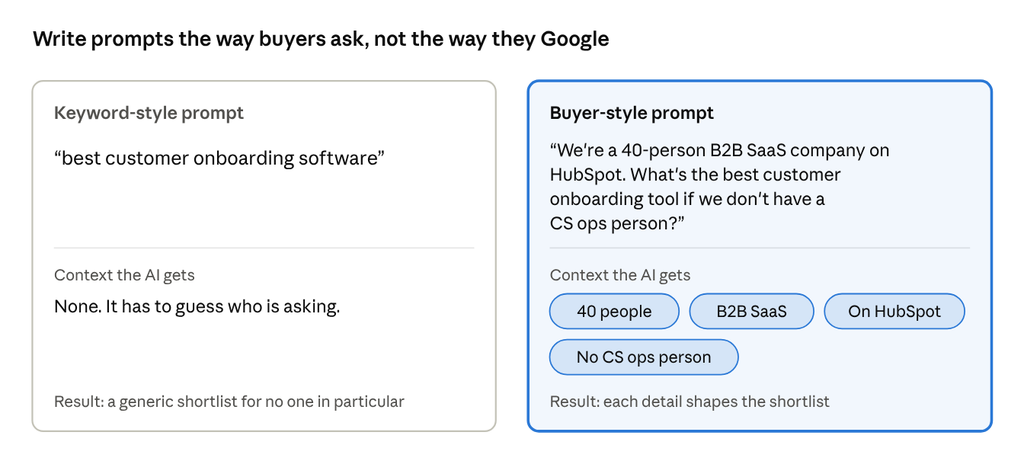
Use templates like these, filled in with your category, your ICP and your real competitors:
| Buyer stage | Prompt template | What it tells you |
|---|---|---|
| Category | “What’s the best [category] for [ICP, e.g. Series A SaaS teams]?” | Whether you make the shortlist at all |
| Problem | “How do I [job] without [pain]?” | Whether you come up before the buyer knows the category |
| Comparison | “[Your brand] vs [competitor] for [use case]” | How the AI frames your trade-offs |
| Alternatives | “[Competitor] alternatives for [segment or budget]” | Whether you catch buyers who want to switch |
| Stack fit | “[Category] that integrates with [Salesforce, HubSpot, Slack]” | Whether your integrations are known |
| Constraints | “[Category] under $[budget] a month for a [size] team” or “with SOC 2 and EU data hosting” | Whether pricing and compliance facts are right |
| Brand facts | “What is [your brand]?”, “How much does [your brand] cost?”, “Does [your brand] have SSO?” | Accuracy: old prices, retired features, outdated positioning |
Get the wording from places buyers write without a marketer in the room. Good sources: sales call recordings, the “what are you looking for” field on your demo form, G2 and Capterra reviews (yours and your competitors’), and Reddit threads in your category. Copy their phrasing. Don’t polish it.
Keep most of the set unbranded. Branded prompts tell you whether the AI describes you correctly. Unbranded prompts tell you whether buyers discover you at all.
Two warnings before you lock the list. First, there’s no reliable “prompt volume” the way there’s keyword volume. Some tools estimate it, but treat those numbers as estimates and pick prompts by how close they sit to revenue. Second, freeze the list for at least a quarter. Every prompt you swap resets your baseline.
Step 2: Pick platforms and lock your test conditions
For most B2B SaaS teams, start with ChatGPT, Google AI Overviews and AI Mode, Perplexity and Gemini. Add Microsoft Copilot if you sell into Microsoft-heavy enterprises, and Claude if your buyers are developers or technical teams.
Track each platform on its own. Their sources differ, and even Google’s two AI features can use different models and show different links (Google). A strong ChatGPT number tells you nothing about Perplexity.
Then remove everything that makes answers personal, so a change in your numbers is a change in the AI, not in your setup:
- Use a clean session. Log out, or use one test account with memory and custom instructions turned off.
- Keep the mode fixed. Web search on, same country. If your buyers are in the US and you’re not, set the location in your tool or use a VPN.
- Start a fresh chat for every run. Follow-up turns carry context from earlier questions.
- Log the model and the date. Model updates can shift answers overnight. ChatGPT’s GPT-6 rollout in October 2026 even changed how its outbound links were tracked (more in Step 5).
One question to ask any tool vendor: do you query the consumer apps or the model APIs? Answers from an API can differ from what a buyer sees in the ChatGPT app, so know which one your numbers describe.
Step 3: Log every answer in one sheet
Use one row per answer, with the same columns every time. A Google Sheet is enough to start, and it’s what you’ll export from any tool later anyway.
| Column | Example entry | What it feeds |
|---|---|---|
| Date | 2026-10-27 | Trends |
| Platform and model | ChatGPT, GPT-6, search on | Explains sudden jumps |
| Prompt ID and stage | P07, Alternatives | Pooling by buyer stage |
| Run number | 3 of 5 | Sample size |
| Brand named? | Yes | Mention rate |
| How you’re framed | Recommended, listed, or warned against | Recommendation rate |
| Competitors named | Rival A, Rival B | Share of voice |
| Your domain cited? | No | Citation rate |
| Cited URLs | g2.com/…, rival.com/vs-page | Source list (Step 4) |
| Wrong facts | “Says no SSO; SSO shipped in May” | Fix list |
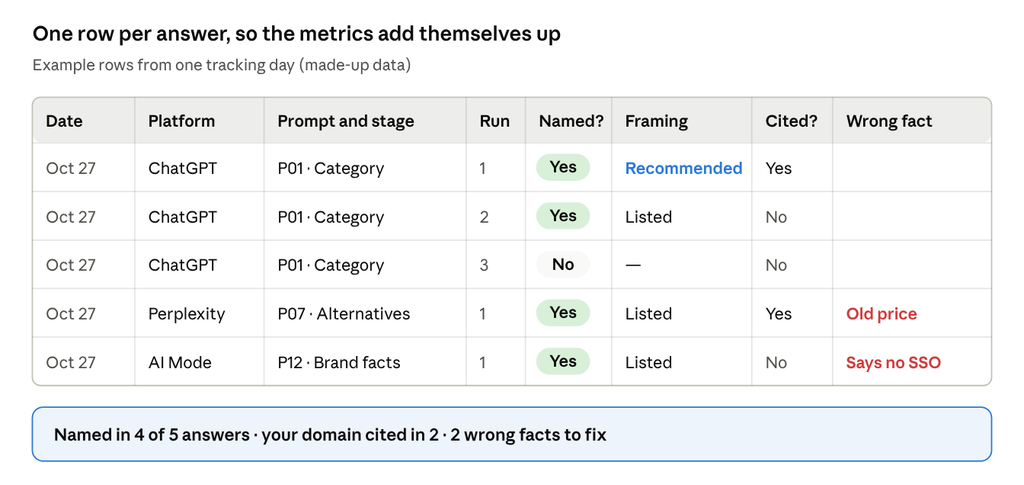
From that sheet, report five numbers per platform:
- Mention rate = answers that name you ÷ all answers
- Recommendation rate = answers that recommend you ÷ all answers
- Share of voice = your mentions ÷ mentions of every brand you track
- Citation rate = answers that cite your domain ÷ all answers
- Accuracy errors = answers with a wrong fact about you
A worked example, with made-up numbers: 20 prompts × 5 runs = 100 ChatGPT answers. You’re named in 34, recommended in 21, and your domain is cited in 12. Your three tracked rivals are named 52, 41 and 19 times.
- Mention rate: 34 ÷ 100 = 34%
- Recommendation rate: 21 ÷ 100 = 21%
- Citation rate: 12 ÷ 100 = 12%
- Share of voice: 34 ÷ (34 + 52 + 41 + 19) = 34 ÷ 146 = 23%
Report mention rate and share of voice side by side. Share of voice can rise while your mention rate falls, simply because rivals dropped out of answers faster than you did.
The “wrong facts” column is the one teams skip, and it’s often the easiest to act on because you control the pages that fix it. A wrong price or a missing integration in an AI answer costs you buyers before they ever reach your site.
Step 4: Track the sources behind the answers
Save every cited URL, then group them by domain and type once a month. That list shows you which pages the AI trusts in your category, and it becomes your fix list.
In B2B SaaS, cited sources usually fall into five buckets. There are review sites (G2, Capterra, TrustRadius), “best [category] tools” listicles, Reddit and community threads, competitor comparison pages, and your own pricing, docs and blog pages. A third-party page that keeps showing up for your category prompts, and doesn’t list you, is your top outreach target.
Don’t read the citation list as the full picture. In the same Ahrefs study, Reddit was one of the most-retrieved sources but only 1.93% of retrieved Reddit URLs were cited (Ahrefs). The AI reads more than it shows.
Two free reports now show your side of the source layer:
| Report | What it shows | Coverage | Limits |
|---|---|---|---|
| Bing Webmaster Tools: AI Performance | Total citations, cited pages, and “grounding queries” (the phrases the AI used to fetch your content). The Topics Portfolio beta, added October 13, 2026, lists “opportunity queries” where other sites are cited and yours isn’t | Microsoft Copilot, AI summaries in Bing, select partners | Public preview; no click data |
| Search Console: Generative AI performance report | Impressions each time links to your site appear in an AI feature, by page, country, device and date | Google AI Overviews and AI Mode; open to all sites worldwide since August 31, 2026 | Impressions only, no clicks; sites with few AI impressions may not see it |
The Bing opportunity list is the closest thing to a free competitor gap report for AI search. Pull it monthly and check those queries against your prompt set.
Both reports only count links to your own site. They can’t see competitors, and they miss mentions without a link. That’s why your prompt log still matters.
When the same third-party pages keep getting cited, getting your product onto them is a link-building job, not a content job. That’s the work our SaaS link building team does: placements on the comparison and “best of” pages buyers and AI already read.
Step 5: Measure the traffic, and the part you can’t see
GA4 has no AI channel out of the box, so AI visits end up mixed into Referral and other buckets. A custom channel group pulls them into one line you can report on, and it works on past data too (Google Analytics Help):
- In GA4, go to Admin → Data display → Channel groups and click Create new channel group. This copies the default group.
- Add a channel called AI assistants with the condition Source matches regex:
.*(chatgpt|openai|perplexity|gemini\.google|copilot|claude\.ai).*
- Click Reorder and drag AI assistants near the top, above Referral. GA4 puts each visit in the first channel it matches, so order matters.
- Save the group. Check your Referral report every few months for new AI sources and add them to the regex.
Standard GA4 properties allow two custom channel groups, so use one wisely.
Now the blind spots. Be upfront about these when you report AI traffic:
- Google’s AI clicks hide in organic. Clicks from AI Overviews and AI Mode arrive as google / organic, and Google folds that traffic into the normal Search Console performance data (Google). GA4 can’t split it out. The Generative AI report gives you impressions, not clicks.
- ChatGPT tracking can break. ChatGPT normally tags its links with utm_source=chatgpt.com. During the GPT-6 rollout, from about October 8 to 15, 2026, links dropped both the tag and the referrer, so ChatGPT visits landed in Direct. Adobe’s Cedric Huesler, who spotted it, said OpenAI told him it was a bug, and tagging came back on October 15 (Search Engine Roundtable; Relevant Audience). Those sessions stay in Direct. Add an annotation for that week so nobody reads it as a drop.
- Many buyers never click. They read the answer, then Google your brand or type your URL days later.
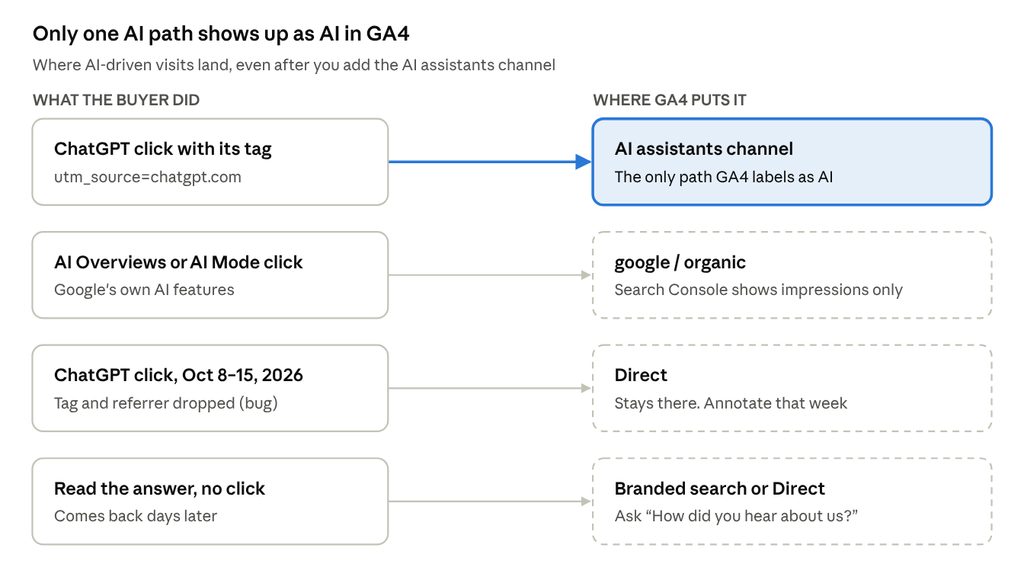
Three cheap ways to see more of it:
- Ask on your demo form. Add “ChatGPT or another AI assistant” to your “How did you hear about us?” field. Self-reported answers are messy, but they’re often the only trace of a buyer who never clicked.
- Watch branded search. Track branded impressions in Search Console next to your AI mention rate. It’s not proof, but the two moving together is worth noting.
- Check your server logs or CDN. ChatGPT-User, Perplexity-User and Claude-User fetch pages when someone’s question needs them (OpenAI, Perplexity, Anthropic). A rise in ChatGPT-User hits on your pricing page suggests it’s being pulled into live answers. If you’re on Cloudflare, AI Crawl Control shows requests by crawler and page; its referral metrics need a paid plan.
Check that AI crawlers can reach your site
Before you treat a low mention rate as a content problem, rule out a blocked crawler. Open yoursite.com/robots.txt and your CDN’s bot settings, and check these user agents:
| Crawler | Company | What it does | If you block it |
|---|---|---|---|
| OAI-SearchBot | OpenAI | Finds pages for ChatGPT search | Your pages stop appearing in ChatGPT search answers (navigational links can still show) |
| GPTBot | OpenAI | Collects content that may be used to train OpenAI’s models | No effect on ChatGPT search. It’s a training opt-out |
| ChatGPT-User | OpenAI | Visits a page when a user’s request needs it | robots.txt may not apply, since a user started the visit |
| PerplexityBot | Perplexity | Indexes pages for Perplexity’s results | You drop out of Perplexity’s results |
| Perplexity-User | Perplexity | Fetches a page for a user’s question | Generally ignores robots.txt |
| Claude-SearchBot | Anthropic | Indexes pages for Claude’s search results | Lower visibility in Claude’s search results |
| Claude-User | Anthropic | Fetches a page when a Claude user asks a question | Claude can’t read your page for that user |
| ClaudeBot | Anthropic | Collects content that could be used for training | Training opt-out only |
Sources: OpenAI, Perplexity, Anthropic, checked October 27, 2026.
A common mistake is blocking every OpenAI bot to opt out of training. If you don’t want your content used for training, block GPTBot and keep OAI-SearchBot allowed. OpenAI says robots.txt changes take about 24 hours to take effect.
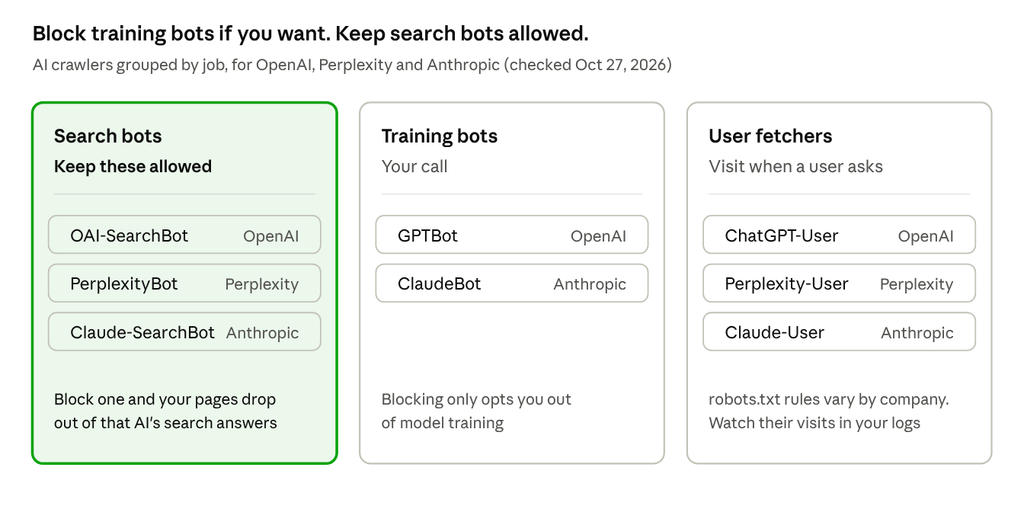
One Google check too. Search Console added a control in 2026 to exclude a site from Google’s generative AI features. If someone on your team switched it on, your pages won’t show in AI Overviews or AI Mode, and the Generative AI report won’t appear.
Free or paid: pick the setup that fits your stage
The main thing a paid tracker buys you is sample size, not dashboards. A tool running 50 prompts daily collects about 1,500 answers per model per month (50 × 30). Logging even 300 answers by hand is a long day.
That said, you don’t need a paid tool until you have a prompt set worth tracking and a manual baseline to compare against.
| Your situation | Setup | Cost |
|---|---|---|
| Early stage, no clear rival set yet | Free checkers once a month, plus Search Console, Bing AI Performance and the GA4 channel | $0 |
| A defined category and 3 to 5 named rivals | One manual baseline (20 prompts × 5 runs on 2 or 3 platforms), then a tracker with 50 to 150 prompts | Roughly $95 to $245 a month at the list prices below |
| Several products, regions or languages | An enterprise tracker with exports, an API and more engines | Custom pricing |
List prices below are monthly billing, taken from each vendor’s own page on October 27, 2026. They change often, so check before you buy.
| Tool | Price shown | What that price includes | Pick it if | Skip it if |
|---|---|---|---|---|
| Ahrefs AI Visibility Checker | Free | One-off snapshot by brand name across ChatGPT, Gemini, Perplexity, Copilot and AI Overviews; top 5 topics, cited domains and cited pages | You want a quick look today | You need tracking over time |
| Semrush AI Visibility tool | Free, 3 checks a day | Score out of 100, mentions, citations and a competitor comparison across ChatGPT, Gemini, AI Mode and AI Overviews | You want a quick competitor snapshot | You need your own prompts |
| Otterly.AI | From $29 (15 prompts); $189 (100 prompts) | Daily tracking on ChatGPT, AI Overviews, Perplexity and Copilot; Gemini, AI Mode and Claude as add-ons | You want daily runs on a small budget | You need Gemini or Claude without paying extra |
| Peec AI | From $95 (50 prompts) | Daily tracking on 3 models of your choice, unlimited users | You want 50 to 150 prompts with the whole team in the tool | You need more than 3 models below Enterprise |
| Semrush AI Visibility Toolkit | $99 (25 prompts) | Prompt tracking on ChatGPT and AI Mode, plus brand reports; Semrush One plans raise the prompt limit | Your team already works in Semrush | You need Perplexity or Gemini prompt tracking |
| Ahrefs Brand Radar | $199 (select platforms); $699 (all platforms, 2,500 custom prompt checks a month) | A large prompt database plus your own prompts, share of voice, history | You want category-wide data, not just your own prompt list | Your budget is under $200 a month |
| Profound | Free 7-day trial (50 prompts, daily); Enterprise is custom | Up to 9 answer engines on Enterprise, plus AI traffic analytics | You need many engines, regions and SSO | You’re early stage |
Whichever you pick, ask the vendor two things: how many times each prompt runs per day, and whether the dashboard shows ranges or only single numbers. A tracker that reports “you’re up 4 points” from a handful of runs has the same sampling problem as a spreadsheet.
What to do with the numbers each month
Tracking only pays off if each month ends with a short fix list. Run the same review every time:
- Read rates with their ranges. Mention and recommendation rate by platform and by buyer stage. Ignore any move smaller than your margin of error.
- Fix wrong facts at the source. Update your pricing page, docs and comparison pages, then the third-party profiles the AI cites (G2, Capterra, partner directories).
- Work the source gaps. List pages cited for your category that don’t mention you, plus Bing’s opportunity queries. Those are your outreach and content targets.
- Fix “cited, not named” prompts. Add clear fit statements and comparison pages, so the page the AI already reads also makes the case for you.
- Check the traffic layer. AI assistant sessions in GA4, AI answers on your demo form, and branded search in Search Console.
- Annotate the month. Note model launches, tracking bugs and big site changes, so next quarter’s dip has an explanation.
The fixing side is its own discipline. Our glossary entry on answer engine optimization explains the two ways AI decides what to recommend. Our entry on brand mentions in LLMs covers why third-party coverage carries so much weight.
If you’d rather have someone run the first baseline with you, our strategy call is 45 minutes with Sitab, our founder. You get a live audit of your top three competitors and an AI visibility scorecard across ChatGPT, Perplexity and Gemini. You keep the roadmap even if we never work together. Book a strategy call.
Frequently Asked Questions (FAQ)
Is AI mention tracking worth it for an early-stage SaaS?
Only if your buyers use AI to build shortlists. Add the “AI assistant” option to your demo form first. If it barely shows up after a couple of months and the GA4 channel is flat, a free monthly check is enough for now. If it does show up, start Step 1.
Do AI answers change by country?
They can. Search-backed answers pull in web results, and Google’s Generative AI report breaks impressions out by country. Run your prompts from the market you sell to, not from where your team sits.
How fast will fixes show up in AI answers?
There’s no reliable number. Answers that use live search can change once the cited pages are re-crawled. What a model knows from training changes only when the model itself is updated. That’s why monthly reporting beats daily checking.
Is “share of model” the same as share of voice?
Mostly, yes. Vendors use different names (share of model, share of voice, visibility score) for close cousins of the same idea: how often you appear compared with competitors. Before you compare numbers across tools, check how each one defines its metric. The formulas in Step 3 give you one consistent version.
Can I automate this with the ChatGPT API?
You can, and some trackers do. Just remember that API answers can differ from what buyers see in the ChatGPT app, especially if web search isn’t switched on. Label API data separately from app data.
Your next step
Write your 20 prompts this week, using the stage table in Step 1 and real phrases from sales calls and reviews. Run each one five times on ChatGPT and one other platform, log the answers, and you’ll have your first baseline before the month is out. Then switch on the GA4 channel and check your Search Console and Bing reports, which takes about as long as making coffee.
Want a second pair of eyes on the baseline? Book a strategy call and bring your prompt list.